keeps tickets, teams, and email communication fully under control.
SkyDesk is designed for organizations that need fast support handling, clear ownership, and clean team
collaboration. Instead of bouncing requests across inboxes and chat threads, every request becomes a
structured ticket with timeline, status, assignment, and full context.
The platform supports both Gmail accounts and Microsoft accounts for
email-based ticket intake, so your teams can work with the provider they already use. Incoming email,
replies, macros, and team visibility all stay connected in one operational workspace.
Gmail Account SupportMicrosoft / Outlook Account SupportTeam-Based RoutingShared Ticket Access
Multi-TeamAssign and route by responsible team
Inbox SyncConvert emails into tracked tickets
Macro SpeedReuse best responses in seconds
Build a cleaner support operation with SkyDesk.
SkyDesk gives your teams one practical system to manage incoming requests, assign ownership, collaborate across departments,
and resolve issues with full context. Whether your email flow is on Gmail or Microsoft, SkyDesk is ready to convert that traffic
into reliable ticket operations.
Three modules that work together.
Use them separately or as one complete workflow.
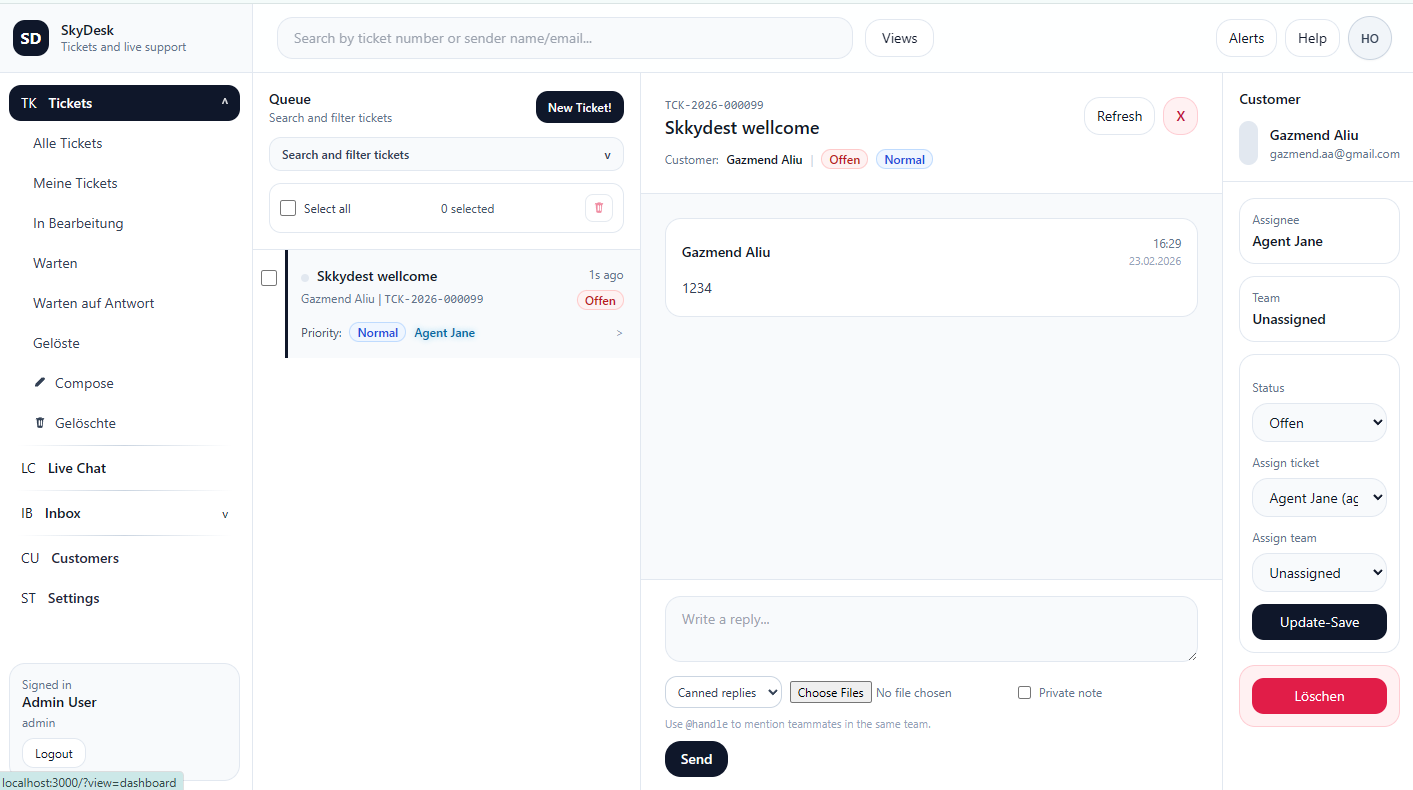
1) Ticket System Image
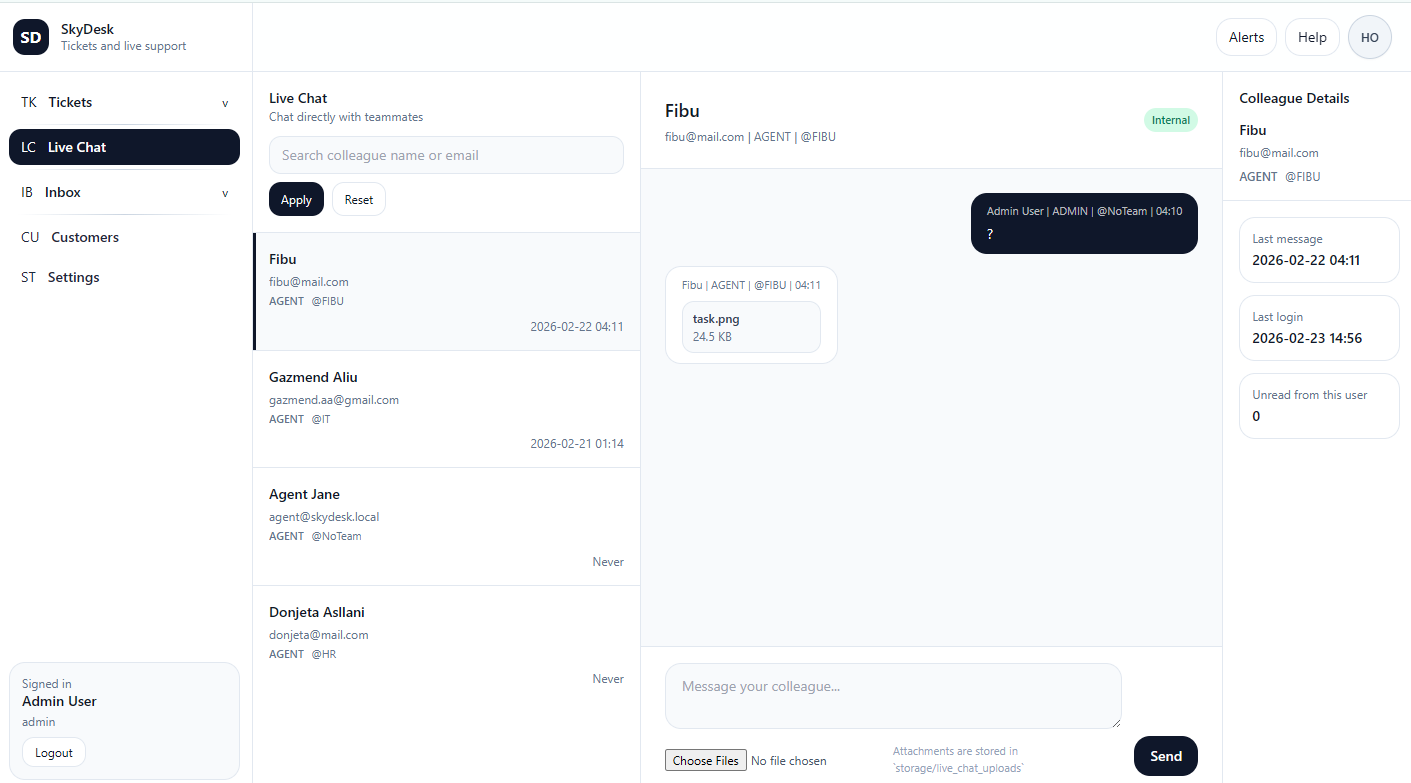
2) Live Chat Image
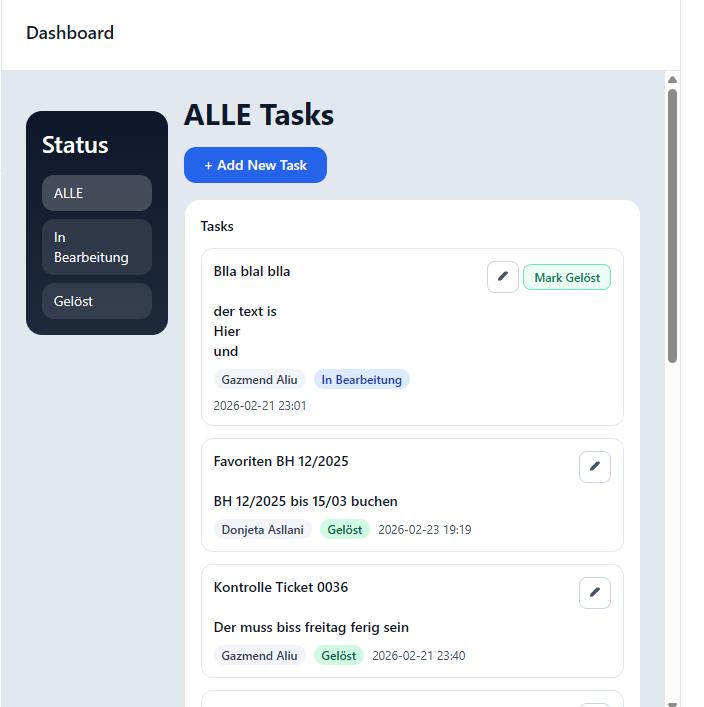
3) Tasks / Notes Image
Ticket System
Queue, statuses, priority, assignment, customer context, history.
Internal Live Chat
Chat with internal users and teammates inside SkyDesk.
Task Manager
Notes, reminders, checklists - mark done when finished.
SkyDesk
Self-hosted support, built around your ownership.
Run SkyDesk on your local machine or private server and keep your operational support data where it belongs:
inside infrastructure you control.
SkyDesk fits organizations that run daily operations through email, need reliable ticket ownership, and
want to reduce confusion between teams. It is especially useful when requests move between finance, IT,
HR, operations, and customer support functions.
Finance Teams
Handle invoice, payment, and reimbursement conversations as tracked tickets with clear accountability and response history.
IT Teams
Manage access requests, mailbox incidents, user setup issues, and technical tickets without losing follow-up replies.
Operations & Admin
Coordinate internal process requests, vendor communication, and policy clarifications from one structured queue.
Customer Service
Track customer requests from first contact to final closure while keeping communication consistent and visible.
Why Teams Choose SkyDesk
Teams choose SkyDesk because it removes ambiguity. Instead of wondering who should reply, where the message
is, or whether another team can access context, the system makes ownership, visibility, and workflow explicit.
Faster Response Time
Incoming email becomes an actionable ticket quickly, reducing wait time for requesters and reducing back-and-forth.
Clear Ownership
Every ticket can be assigned to team and agent, and ownership state is visible to everyone with permission.
No Lost Threads
Email replies are linked into the right ticket context so discussions remain complete and searchable.
Operational Accountability
Status history, actions, and updates are easier to audit, review, and improve over time.
What This App Does End to End
SkyDesk combines intake, triage, assignment, communication, and closure into one workflow. The result is a complete
service desk cycle that can support daily ticket volume with fewer blind spots and less manual coordination.
Email to Ticket Conversion
Connect inboxes and import messages into ticket threads with sender, subject, and body context preserved.
Gmail + Microsoft Providers
Use Gmail accounts or Microsoft accounts for ticket intake depending on your team setup and provider preference.
Ticket Numbering and Tracking
Each ticket receives a unique reference number for follow-up, reporting, and communication consistency.
Status and Priority Management
Define and update states such as open, in progress, deleted, and resolved, plus ticket urgency levels.
Team Assignment Logic
Assign tickets to the right team and choose only relevant agents from that team to avoid assignment mistakes.
Shared Team Access
Grant cross-team visibility where required and maintain a clear "shared with teams" collaboration pattern.
Macro-Based Replies
Create team-specific macro responses for common scenarios to improve speed and response consistency.
Unread Alerts and Notifications
Notify relevant staff about new tickets and replies, and avoid stale alerts for tickets no longer available.
Soft Delete and Permanent Cleanup
Move tickets to deleted view first, then permanently remove them to keep database storage clean over time.
Security, Access, and Control
Self-hosted by design: SkyDesk is built to run on your local machine or private server,
so tickets, messages, and attachments stay in infrastructure you control. Your desk. Your server. Your data.
Role-Based Access
SkyDesk applies role rules for admin, agent, and customer users. Each role sees and performs only the actions it should.
Agents can work in team scope, admins can manage wider configuration and provider connections, and customer visibility stays isolated to owned requests.
This keeps daily work practical while still giving administrative control where needed.
Team Visibility Boundaries
Ticket access can be bound to team membership and optionally expanded through explicit sharing when cross-team collaboration is required.
Instead of exposing everything globally, SkyDesk encourages intentional visibility rules based on actual operational responsibility.
This model helps preserve privacy, reduce noise, and keep each team's queue meaningful.
Real Workflow Example
SkyDesk is strong in cross-team scenarios. For example: FIBU sends a message to IT, IT replies, and both teams still need visibility.
The platform can preserve context and shared ownership so no team loses the ticket trail.
01
Message Arrives
An email enters a connected provider inbox and gets picked up by the sync worker.
02
Ticket Created or Matched
SkyDesk creates a new ticket or attaches reply content to the matching existing ticket thread.
03
Team Ownership Applied
Ownership and sharing rules decide which team handles it and who can see it across team boundaries.
04
Reply, Resolve, and Close
Agents respond with context, apply macro templates where needed, and close with full history retained.
What Teams Say
"Before SkyDesk, we had reply confusion between inboxes. Now every request has an owner and clear timeline."
Finance Lead, Internal Services
"The team-based assignment and shared ticket model solved our IT-to-FIBU handoff pain immediately."
IT Operations Agent
"Macros and structured statuses reduced repetitive work and made our response quality more consistent."
Support Coordinator
Frequently Asked Questions
Does SkyDesk support both Google and Microsoft mailboxes?
Yes. SkyDesk supports Gmail accounts and Microsoft accounts for provider-based inbox synchronization and ticket intake.
Can teams keep separate macros and assignment scope?
Yes. Team scoping helps keep macros, assignees, and workflow actions relevant to each team context.
Can one ticket be visible to more than one team?
Yes. Tickets can be shared across teams when collaboration is required, while preserving a clear owner.
Does SkyDesk keep history for audits and process review?
Yes. Ticket replies, status updates, and actions remain in structured records for follow-up and accountability.